 WhatsApp: +86 16626708626
 Email:
  Phone: +86 16626708626
Description
Product Model: IC754VBF12CTD-CB
Product Brand: GE (GE Intelligent Platforms / GE Fanuc)
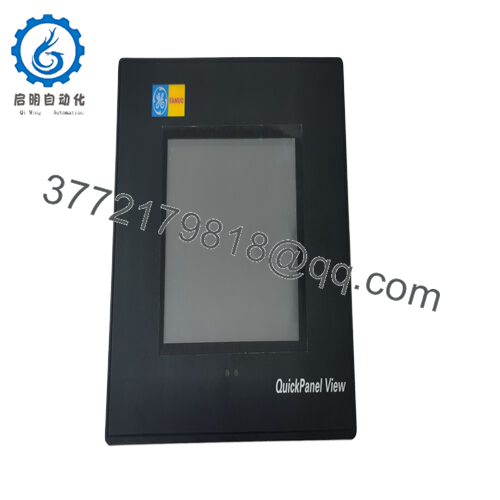
Product Series: QuickPanel View (12-inch)
Product Features:
- Large 12″ colour TFT touchscreen operator interface designed for both HMI and local controller usage.
- Runs on Microsoft Windows CE and supports full-featured operator panel functionality and module control.
- Built-in communications ports including USB, RS-232, RS-485, Ethernet plus optional CompactFlash slot for memory expansion. Designed for industrial environments, offering reliable performance in harsh conditions; supports 12-24 V DC input and comes from a discontinued but well-supported legacy line.

- IC754VBF12CTD-CB
Technical Features & Benefits
When you take a close look at the IC754VBF12CTD-CB, you’ll find a smart blend of operator interface and controller-capable hardware that gives automation engineers flexibility and reliability. The 12-inch colour TFT touchscreen provides a clear, wide-format view of process visuals—ideal for machines, skids or panels where operator clarity matters. The panel supports an 800 × 600 resolution colour display with resistive touchscreen in many of its configurations. Its memory architecture is substantial for its vintage: the device includes 64 MB of DRAM, 64 MB of Flash (non-volatile) memory and 512 kB of battery-backed SRAM for retentive data storage in the event of power interruption. That means your recipes, alarm history or operator screens can survive a power outage without needing a full re-initialization.
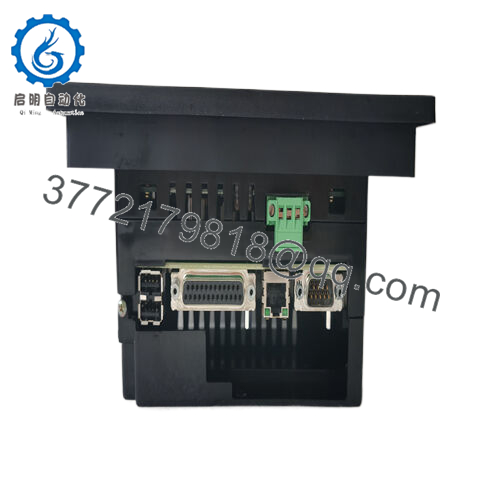
From a connectivity standpoint, the IC754VBF12CTD-CB offers multiple standard ports: USB 1.1, RS-232, RS-485 and Ethernet 10/100. That breadth of communication ensures it can integrate smoothly into modern networks or legacy links. The optional CompactFlash slot adds scalability for log data, upgrades or custom applications. And because it runs Windows CE, transitioning from other Windows-based HMIs is relatively straightforward—leveraging familiar application code and tools therefore reduces development effort. On the build quality side, the unit is rated for industrial environments with DC power input (12-24 V DC) and operating ambient temperature ranges of about 0-50 °C, with storage down to -20 °C. In my field experience, having such an all-in-one HMI/controller unit speeds installation: instead of buying a separate PC, HMI screen and controller card, you mount this panel, wire the DC power, plug in your network cables and you’re largely ready to go. The combination of the screen and control capability reduces panel real estate and simplifies maintenance. If something goes wrong with the panel, you’re dealing with one device rather than three. That’s one reason this model still finds use in retrofit scenarios.
Product Role & System Fit
In a modern automation setup, the IC754VBF12CTD-CB can serve as either a dedicated operator interface or as a hybrid HMI/controller for local machine control. Imagine you have a packaging line with a local skid that requires both operator display (for status, recipes, alarms) and discreet local logic (for conveyors, sensors, vision I/O). Rather than deploying a separate PLC, I/O rack and HMI, you install the QuickPanel and program it to handle the local logic while also presenting the screen. This consolidates hardware, lowers wiring complexity and often reduces total cost.
In a layered control architecture it fits particularly well as the “machine-level” human-machine interface, sitting downstream of a plant-level MES or SCADA system. The main SCADA might talk via Ethernet to the IC754VBF12CTD-CB; simultaneously, the panel might handle direct links to I/O, motion controllers or robots via RS-232/485 or Ethernet. Because of its broad communication support, it can easily bridge older serial devices with newer Ethernet-based networks.
Given that many plants still run legacy systems from GE Intelligent Platforms or GE Fanuc, this panel is especially useful in retrofit scenarios. Upgrading a vintage HMI might require as little change as replacing the old panel with an IC754VBF12CTD-CB, transferring the wiring and perhaps updating the screen design, rather than re-architecting the entire machine. Since it uses the QuickPanel line mounting style and supports common operator interface software like Proficy, the fit is quite seamless.
From system-maintenance and future-proofing viewpoints, one should also consider how this panel matches with remote I/O, Ethernet switches, and connectivity to higher level systems. The panel’s Ethernet port gives you direct network access. At installation time you’ll also want to verify firmware version and OS compatibility, ensure backup of your application code, and map out your network addressing to ensure this panel integrates cleanly into your existing network layout. In short, the IC754VBF12CTD-CB plays the dual role of operator display and local controller, bridging man-machine interface with automation logic—and in legacy systems and retrofit efforts, it remains a cost-effective choice.
Applications & Industry Context
Across manufacturing, packaging, water treatment, material handling and process control industries, having a reliable operator interface combined with local logic capability is vital. The IC754VBF12CTD-CB is tailored for environments where an operator on the line needs visibility into machine status, settings, alarms—and where the machine needs built-in local logic to respond quickly to sensors, actuators and I/O.
For example, in a food and beverage packaging line you may have a 12-inch touch panel mounted on the machine’s frame. The operator uses this panel to select recipes, monitor line throughput, view fault history and adjust jam-clear parameters. Behind that, the panel’s logic handles change-over sequences: it monitors sensors, drives actuators, coordinates greeting conveyors, vision system feedback and reject logic—all without escalating to the plant PLC for every step. That means faster response times and reduced load on the central controller.
In a water/wastewater facility, you might deploy the panel near a skid of dosing pumps, pH sensors, flow meters and valve actuators. The panel provides local HMI visibility and controls the dosing sequence; simultaneously, it talks upstream to SCADA via Ethernet. Because the IC754VBF12CTD-CB has RS-485 support, you could network modest sensor clusters and modbus devices directly to it. And since many municipalities still run legacy automation gear, the compatibility of the panel with older serial networks is a big advantage.
In machine building, if you supply the panel along with your equipment, you provide your end-customer with a ready-to-mount 12-inch HMI/controller. The size is large enough for rich visuals and operators appreciate that. And because the unit is well-known, support, spare parts and service are easier to obtain—even though the model is discontinued. Indeed, many automation service providers keep stocks of this unit for just such retrofit jobs. The key challenges—especially in retrofit or brownfield sites—are ensuring power supply (12/24 V DC), verifying mounting cut-out, confirming firmware version and ensuring your operator code is backed up.
Installation & Maintenance Insights
When installing the IC754VBF12CTD-CB, you’ll want to follow best-practice recommendations to maximize reliability and ease maintenance. First, the panel requires 12 – 24 V DC power input; it’s important to ensure your power supply is adequately sized, and that any upstream dip or noise is filtered to avoid lock-ups or reset events. According to the datasheet, the unit tolerates input dips for short durations. DO Supply The mounting cut-out on your panel or skid should fit the 12″ housing properly with sufficient clearance for ventilation and wiring—since heat build-up in tightly enclosed panels is a common fault source.
Cable routing for the Ethernet, USB, RS-232/485 ports and any optional CompactFlash card must follow EMC and shielding best practices: keep signal cables separate from high-voltage or mains supply lines; ground shields properly; terminate RS-485 networks with the recommended resistor if you have multiple devices. Since the unit is often used in retrofit environments, check the existing wires and connectors for wear before re-using.
Once installed, ensure firmware is up-to-date (if supported) and backup the full application code and memory image. Because the panel supports battery-backed SRAM, you’ve got retentive memory for crucial operator data—but you still want regular backup of your full HMI and logic files. In the field I’ve seen panels that have been running for years without disturbance—but when the installed version wasn’t documented the first thing you do after failure is try to locate the firmware version and backup image. With this model, it’s wise to keep a spare panel on shelf if the machine is critical and downtime is unacceptable.
Maintenance should include periodic checks: confirm the fan or venting (if any) remains unobstructed, verify that the display back-light is still at acceptable luminance (over time, brightness can drop), check the touch screen calibration and responsiveness, and test operator interface actions (e.g., screen transitions, alarm pop-ups) to ensure performance hasn’t degraded. If the environment is dusty or harsh (metal-working, welding, etc.) ensure the panel front is cleaned with appropriate solution (non-abrasive) and that the cover remains sealed. Given that the IC754VBF12CTD-CB is discontinued, parts availability is more limited, so it’s important to maintain documentation, firmware image and a clear inventory of any required spare parts (for example, the back-light or board assembly). And when it’s time for a full upgrade, plan the migration early: monitor the panel health and consider next-generation replacements when lead time on spares lengthens.